
 Welcome to Cambridge Education College
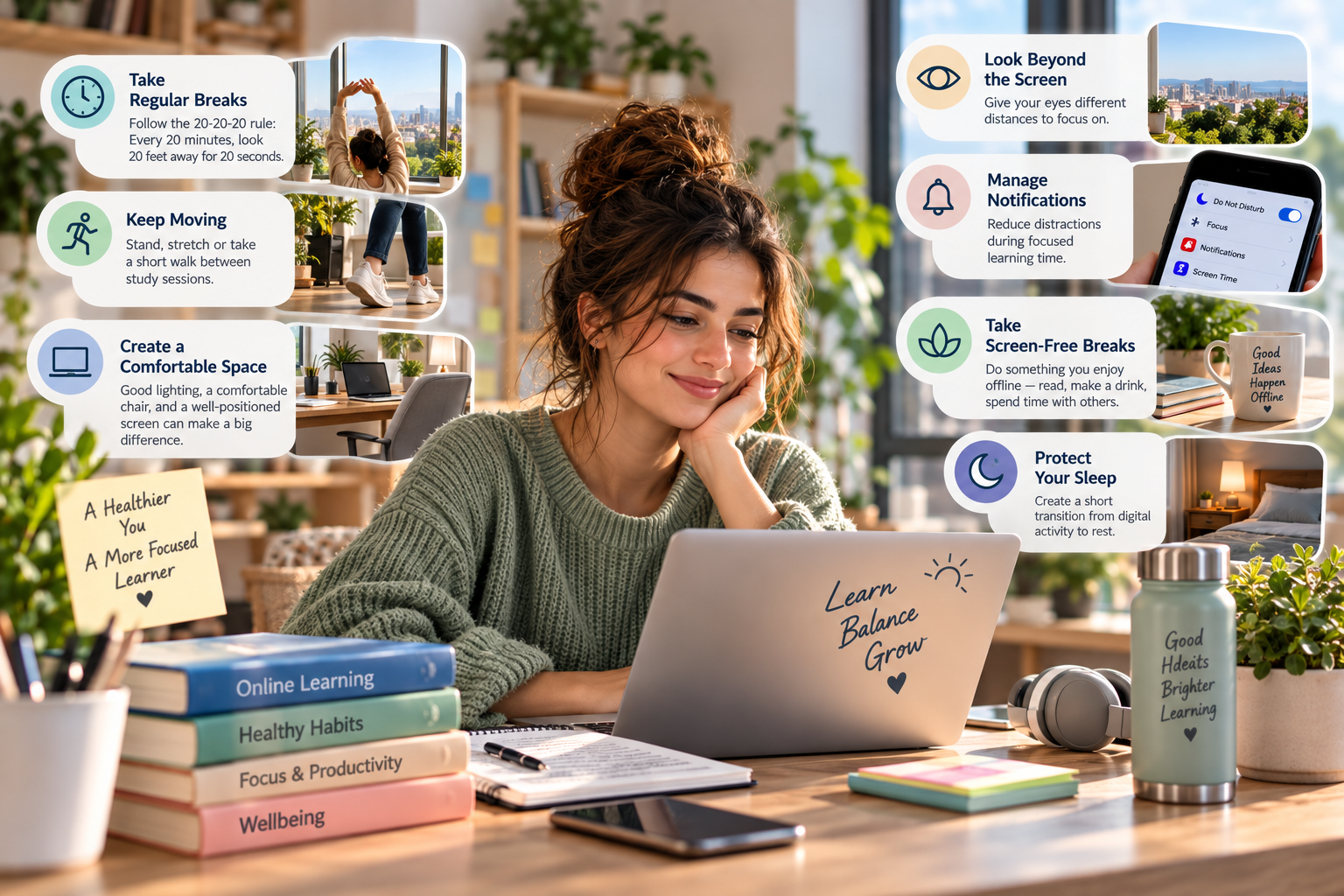
Health, Fitness & Wellbeing • 8 min read
Online learning gives us the freedom to study from almost anywhere. A laptop can become a classroom, a smartphone can provide access to learning resources, and digital platforms can connect learners and instructors across different locations.
But this flexibility also means that many learners spend a significant part of their day looking at screens.
You may use a computer for work, switch to your phone during a break, attend an online session in the evening, complete an assignment on your laptop, and then relax by watching a film or scrolling through social media.
Before long, much of the day has become digital.
At Cambridge Education College, our vocational and professional programmes are delivered online, so technology naturally plays an important role in the learning experience. The goal is not to avoid screens, but to develop healthier digital habits that allow technology to support learning without unnecessarily taking over the rest of your day.
Finding balance starts with using technology with greater purpose.
When people hear the phrase “screen time”, they may imagine that every hour spent in front of a device has the same effect or purpose.
But there is an important difference between using a laptop to participate in a learning session, writing an assignment, having a video call with family, and scrolling through social media without a clear purpose.
Instead of focusing only on the number of hours spent looking at screens, it can be more useful to ask:
What am I using this screen for?
Is it helping me achieve something important?
Do I need to be using it right now?
How do I feel after using it for a long period?
The objective is not necessarily to minimise every minute of screen use.
It is to become more intentional about how technology fits into your day.
When you are focused on an assignment or online session, it is easy to remain in the same position for a long time.
Hours can pass surprisingly quickly.
Short breaks can help interrupt long periods of continuous screen use.
After completing a section of an assignment, you might stand up and walk around.
Between online sessions, you could step away from your desk.
After reviewing several pages of digital material, look away from the screen for a short period.
One commonly used approach for eye comfort is the 20-20-20 rule: after around 20 minutes of screen use, look at something approximately 20 feet away for around 20 seconds.
You do not need to become obsessed with exact timings. The broader idea is simple:
give your eyes and attention regular opportunities to shift away from the screen.
A short break does not necessarily reduce productivity. It may help you return to your work with renewed attention.
Online learning can involve a great deal of sitting.
If you also work at a computer, you may spend much of your working and learning day in the same position.
Movement does not need to mean completing a full workout every time you take a break.
Small changes can help break up long periods of sitting.
Stand while reviewing a short document.
Stretch between learning activities.
Walk around during an appropriate audio call.
Take a short walk before beginning your next study session.
Use the stairs where practical.
Include regular physical activity in your weekly routine.
The goal is not to create another complicated schedule.
It is simply to avoid allowing several hours of sitting to pass unnoticed.
Your learning routine should make room for movement as well as concentration.
How you use your device can matter as much as how long you use it.
If you spend significant time studying online, consider your learning environment.
Is the screen positioned comfortably?
Are you constantly leaning forward?
Is the text so small that you need to move closer to read it?
Is there distracting glare?
Are you working in an uncomfortable position?
A simple learning space can often be improved without expensive equipment.
Position your device so that you can use it comfortably.
Adjust text size where necessary.
Use suitable lighting.
Reduce distracting reflections on the screen.
Choose a chair and surface that allow you to work in a reasonably comfortable position.
Keep frequently used items nearby so that you are not constantly twisting or reaching awkwardly.
There is no need to create a perfect professional office.
The objective is to create an environment that supports comfortable and focused learning.
Online learning often requires us to focus on something close to us for extended periods.
Laptop.
Tablet.
Phone.
Notes.
Then another screen.
Try giving your eyes opportunities to focus at different distances.
Look through a window.
Look across the room.
Step outside during a break.
Avoid moving directly from a long study session on your laptop to immediately scrolling through your phone if you do not need to.
Sometimes the best digital break is not changing from one device to another.
It is putting the devices down for a while.
Not all digital strain comes from looking at a screen.
Some comes from the feeling of being constantly interrupted.
An email arrives.
A message appears.
A social media notification pops up.
A group chat becomes active.
Another application requests your attention.
Then you return to your assignment and try to remember what you were thinking.
This cycle can repeat throughout the day.
During focused learning periods, consider disabling non-essential notifications.
Use your device's focus settings if they are helpful.
Close applications and browser tabs you do not need.
You might also choose specific times to check messages rather than responding every time something appears.
The objective is not to disconnect from everyone.
It is to decide when technology deserves your attention rather than allowing every notification to decide for you.
Imagine that you have been studying on your laptop for an hour.
You decide to take a ten-minute break.
Then you pick up your phone and spend those ten minutes watching short videos.
Technically, you stopped studying.
But you did not really take a break from digital stimulation.
Try creating some screen-free breaks.
Make a drink.
Stretch.
Walk.
Open a window.
Speak to someone.
Prepare something to eat.
Sit somewhere away from your desk.
Even a short period without a device can create a clearer separation between one learning session and the next.
Online learners often study in the evening because that is when work and other responsibilities have finished.
This can make the transition from studying to sleeping particularly important.
If possible, avoid making your final waking moments a continuous sequence of assignments, emails, messages, social media and videos.
Create a short transition between digital activity and rest.
Finish your study session.
Organise what you need for tomorrow.
Close your learning platform.
Put your materials away.
Reduce unnecessary digital activity.
Give yourself time to slow down.
You do not need an elaborate evening routine.
Even a simple boundary between “I am studying” and “the day is finished” can be helpful.
Smartphones are extremely useful for online learners.
You can check programme updates.
Access learning materials.
Use your calendar.
Review notes.
Communicate with others.
Scan documents.
Listen to educational content.
But the same device also contains entertainment, news, social media, games, messages and endless opportunities to scroll.
The challenge is that we often pick up our phones automatically, without deciding why.
Try asking yourself:
“What am I opening my phone to do?”
If you know the answer, complete the task.
Then put the phone down.
This small habit can help separate intentional technology use from automatic technology use.
One way to reduce unnecessary screen dependence is to vary how you study.
Not every learning activity needs to happen entirely on a device.
After reading a digital resource, close the screen and write down what you remember.
Use a paper notebook to create a summary.
Explain a concept aloud without looking at your notes.
Sketch a simple diagram.
Practise recalling key points while walking.
Think through a problem before searching for the answer online.
This does more than provide a screen break.
It can make learning more active.
Instead of continuously consuming information, you begin retrieving, explaining and applying it.
Technology remains part of the learning process, but it does not need to occupy every moment of it.
For an online learner, some screen use is necessary.
You may need to attend an online session.
Complete an assignment.
Access programme materials.
Communicate with an instructor.
Submit your work.
Those activities are part of the learning experience.
But other digital activities are optional.
Scrolling through social media.
Watching another video because it was automatically recommended.
Checking the same application repeatedly.
Reading notifications that are not urgent.
When you feel that you are spending too much time on devices, reducing essential learning time may not be the most practical place to start.
Instead, examine the optional digital time surrounding it.
You may discover that your online programme is only one part of your total screen use.
Interestingly, your devices can also help you develop healthier digital habits.
Many phones and computers provide tools that allow you to:
monitor screen use;
silence notifications;
schedule focus periods;
limit certain applications;
reduce interruptions;
adjust display settings;
or create different modes for work, study and personal time.
These tools do not need to control your life.
Use them when they solve a real problem.
For example, if social media repeatedly interrupts your study sessions, a focus mode may help.
If you lose track of time while using a particular application, a usage reminder might be useful.
If notifications disturb your evening, scheduled quiet periods may create a clearer boundary.
Technology is most helpful when you decide how it should support your behaviour.
It is easy to turn healthy habits into another source of pressure.
You may see advice telling you to eliminate social media, wake up at a particular time, exercise every morning, stop using devices hours before bed, track every minute and maintain a perfect routine.
Real life is rarely that organised.
Some days will involve more screen time than others.
You may have a long online session.
An assignment deadline may require additional computer work.
Your job may already involve technology throughout the day.
The goal is not perfection.
It is awareness.
Notice your habits.
Identify what is causing problems.
Make realistic adjustments.
Then observe whether those changes help.
Small improvements that you can maintain are often more valuable than dramatic routines that disappear after a week.
Healthy digital habits can begin with a few simple boundaries.
For example:
No unnecessary phone use during focused study sessions.
Take a short movement break between major learning tasks.
Eat meals away from the laptop when practical.
Keep one part of the evening relatively screen-free.
Avoid checking programme messages continuously throughout the day.
Put the phone away when spending time with family or friends.
Your boundaries may look completely different.
Choose ones that address your own habits.
The important thing is that they are realistic enough to become part of everyday life.
Sometimes the simplest feedback comes from your own body.
You may notice tired eyes.
A stiff neck.
Shoulder discomfort.
Difficulty concentrating.
Restlessness.
A headache.
Or simply the feeling that you have been staring at the screen for too long.
Do not automatically treat these signals as something to push through.
They may be a reminder to change position, move, rest your eyes or take a short break.
If you experience persistent or significant symptoms, consider seeking advice from an appropriate healthcare professional rather than assuming they are simply a normal part of online learning.
Healthy learning should not mean ignoring ongoing discomfort.
Digital literacy is often described as knowing how to use technology.
But knowing when not to use it is also valuable.
A digitally confident learner should be able to use online platforms, communicate appropriately, manage digital information and explore new technologies.
But they should also develop the judgement to recognise when technology is becoming distracting, unnecessary or counterproductive.
That includes knowing when to:
silence notifications;
close unnecessary tabs;
step away from the screen;
verify information;
protect personal data;
and choose an offline activity when technology is not needed.
Being digitally skilled is not about being connected every minute.
It is about using technology purposefully and responsibly.
At Cambridge Education College, online learning provides learners with the flexibility to develop practical knowledge and professional skills from wherever they are.
Digital platforms are an important part of that experience.
But technology should remain a tool.
A healthy online learning routine can include:
focused study;
regular movement;
appropriate breaks;
offline activities;
social interaction;
rest;
sleep;
and time when you are simply not studying.
Balance will look different for everyone.
Someone working on a computer all day may need more deliberate screen-free time.
Another learner may have more flexibility during the day.
Someone may prefer handwritten notes.
Another may work almost entirely digitally.
There is no single perfect formula.
The objective is to develop a relationship with technology that supports both your learning and your wider wellbeing.
Online education would not be possible in its current form without digital technology.
Screens allow us to connect.
Learn.
Communicate.
Create.
Collaborate.
Explore.
And access opportunities across geographical boundaries.
The solution is therefore not to treat technology as the problem.
The challenge is to use it intentionally.
Take breaks.
Move regularly.
Create a comfortable learning environment.
Protect your attention.
Reduce unnecessary notifications.
Give your eyes opportunities to look away from the screen.
Create boundaries between learning and rest.
And remember that not every free moment needs to become another digital moment.
At Cambridge Education College, we believe technology should make professional learning more flexible and accessible while supporting a learning experience that can fit realistically into modern life.
Use your screen to learn — but remember to look beyond it too.
 Programs